You are sitting in front of your screen, planning your new business site, and a massive point of confusion hits you:
“Should I build a quick 1-page site, or do I need 5, 20, or 100 pages before Google and clients take me seriously?”
Here is the truth:
There is no magical, arbitrary page number you have to hit.
If you build 50 empty pages with no real substance, visitors will leave instantly. If you cram ten different services into a single, endless page, your visitors will get lost, get overwhelmed, and hit the back button.
Matching your site depth to your customer’s intent is the secret.
Here is how to calculate the exact page count your website needs to rank high, build trust, and turn random visitors into paying customers.
The Minimum Viable Website: The 5 Essential Core Pages
If you are launching quickly on a budget, you do not need a massive site structure.
You need the Minimum Viable Website.
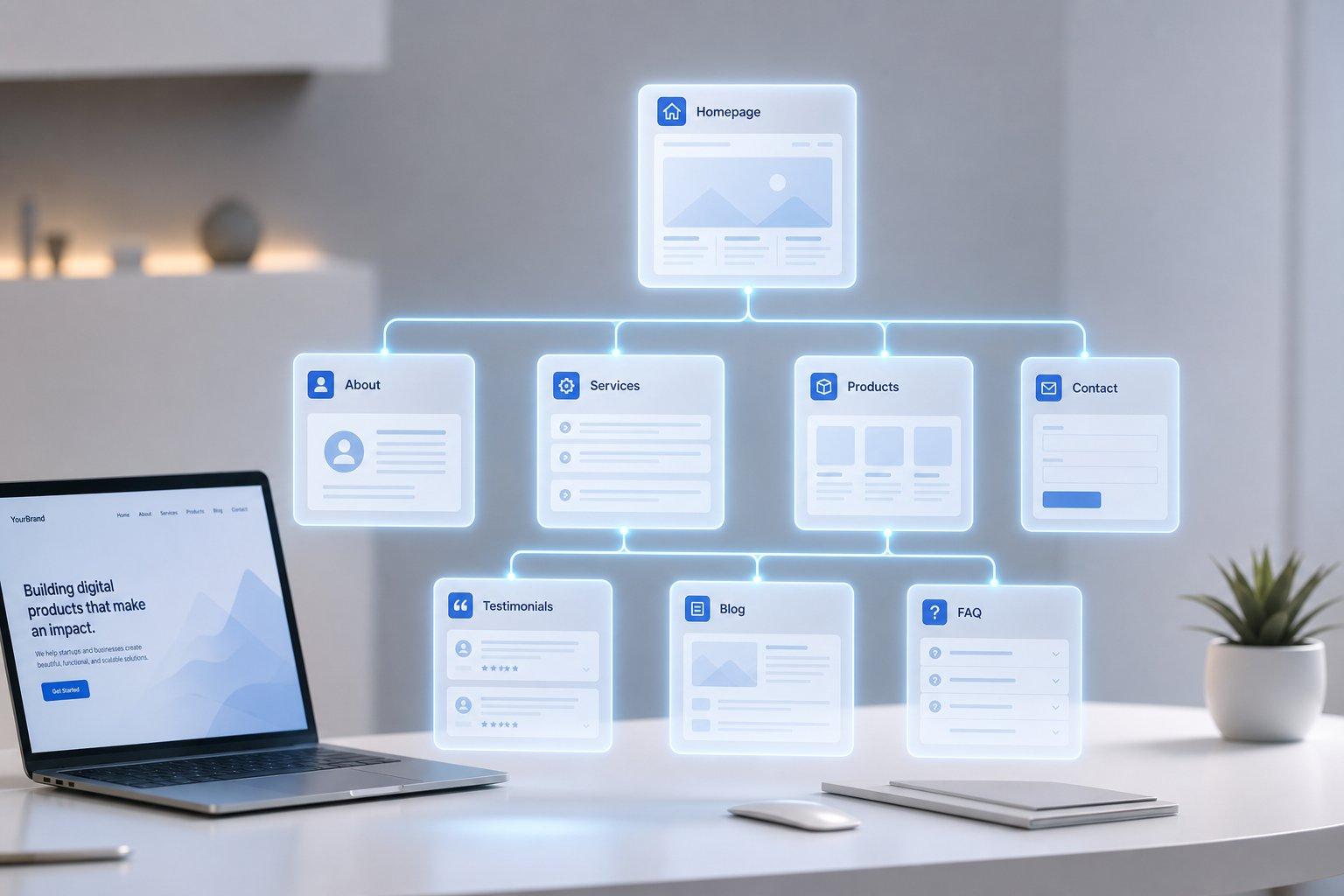
For almost every business, the absolute minimum starting point is a tight, 5-page framework:
[ HOMEPAGE ]
[ About Us ]
[ Services ]
[ Contact ]
[ Privacy Policy ]
- Homepage: Catches your visitor’s attention in five seconds, outlines your core value, and directs them to your main offer.
- About Page: Proves your credibility, shares your story, and builds human trust.
- Services / Products Page: Breaks down what you sell, what is included, and how much it costs.
- Contact Page: Provides an easy form, your phone number, email address, and physical location.
- Privacy Policy / Terms: Protects your business legally and keeps search engines happy.
If you are just getting started, this 5-page structure gives you everything required to accept leads and start taking orders.
Single-Page vs. Multi-Page Websites: Which Fits Your Offer?
Can you just build a long, single-page scrolling site, or will that hurt your sales and search rankings?

It depends entirely on what you are selling.
SINGLE-PAGE VS. MULTI-PAGE
[ Single-Page Site ]
- 1 Simple Offer
- Portfolio / Single Event
- Fast Setup
[ Multi-Page Site ]
- Multiple Services
- Local City Target
- Full SEO Strategy
| Site Structure | Best Used For | Major Advantage | Major Disadvantage |
|---|---|---|---|
| Single-Page Site | Single offers, event launches, portfolios, simple local services. | Super fast setup, seamless scrolling experience on mobile phones. | Extremely difficult to rank for multiple target search terms on Google. |
| Multi-Page Site | Growing businesses, e-commerce stores, companies offering multiple services. | Excellent search visibility; allows dedicated pages for every service. | Requires more content, image planning, and menu organization. |
Here is the bottom line:
If you sell one specific thing, a single-page layout works great. If you offer multiple distinct services or target different locations, you need a multi-page site structure.
Website Page Count by Industry
How many pages do businesses in your specific market usually build?
Look at how optimal page counts scale across different business models:

- Freelancers & Consultants (3 to 5 Pages): A simple homepage, an about page, a portfolio layout, a services list, and a contact page.
- Local Service Businesses (10 to 30 Pages): Core company pages, plus dedicated pages for every specific service you offer and every city you serve (e.g., Emergency Plumbing in City A vs. Pipe Repair in City B).
- SaaS Companies (20 to 50+ Pages): Feature breakdowns, customer use-case pages, integrations, pricing tiers, and comparison pages against competitors.
- E-Commerce Stores (50 to 1,000+ Pages): Category pages, sub-category filters, and individual product pages for every item in your inventory.
The SEO Reality: How Page Count Impacts Search Rankings
Does having more pages automatically make you rank higher on Google?
Not necessarily.

Google does not care about your total page count; it cares about search intent.
[ Thin, Empty Pages ] ──► Dilutes Authority ──► Lower Search Rankings
[ Focused Intent Pages ] ──► Builds Expertise ──► Higher Search Rankings
If you create 30 short, repetitive pages that say the exact same thing, search engines mark your site as spam and ignore it.
However, when you build individual, high-quality pages that answer specific search queries—such as dedicated pages for specific services—search engines recognize your topical authority and send you targeted organic traffic.
The Service & Location Multiplier: Scaling Without Duplicate Content
What if you offer four core services across five neighboring towns?
Should you create 20 different location pages?
Yes, but only if every page offers real, distinct value to the reader.
Use this simple matrix to scale your location pages safely:
$$\text{Total Pages} = \text{Core Pages} + (\text{Services} \times \text{Locations})$$
For example:
$$\text{5 Core Pages} + (4 \text{ Services} \times 5 \text{ Locations}) = 25 \text{ Target Pages}$$
Keep every page unique by featuring local customer reviews, real photos from local job sites, and clear location details. Never just copy and paste the same paragraph while swapping out city names.
E-Commerce Page Depth: Structuring Products and Collections
If you are running an online store, site size can explode rapidly.
To keep visitors from getting lost, organize your store using a simple 3-tier structure:
[ Root Category: Men's Footwear ]
│
▼
[ Sub-Category: Running Shoes ]
│
▼
[ Product Page: Trail Runner Pro ]
Keep your visitor no more than three clicks away from any product. When customer navigation is simple and organized, shoppers find items quickly and finish checking out without frustration.
The Blog & Content Engine: When to Expand Past 100+ Pages
When should you stop building static business pages and start publishing blog posts?
Publishing blog articles is how you capture readers who are researching problems before they are ready to buy.

- Static Pages (1 to 20 Pages): Capture high-intent buyers searching for direct services (e.g., "Hire local web designer").
- Informational Articles (20 to 100+ Pages): Capture potential leads asking research questions (e.g., "How much does a website cost?").
Start with your core business pages first. Once your service pages are live and taking orders, build a simple blog engine to publish informative articles that link directly back to your service offerings.
The Danger of Over-Building: Bloatware and Choice Fatigue
Building more pages than you can maintain creates serious risks:
- Navigation Confusion: When menus are packed with dozens of links, visitors get overwhelmed and leave.
- Wasted Search Crawls: Search engines waste time scanning dead, empty pages instead of indexing your core sales offers.
- Outdated Information: The more pages you have, the harder it is to keep prices, team details, and offers updated.
If a page does not answer a real customer question or drive sales, delete it or combine it with a main page.
Calculate Your Exact Page Budget Before You Build
Ready to outline your site architecture? Use this basic formula to map your exact starting scope:

$$\text{Starting Page Scope} = \text{Core Pages (5)} + \text{Unique Services} + \text{Main Collections}$$
Example Calculation:
- 5 Core Pages (Home, About, Services Overview, Contact, Privacy)
- 3 Specific Service Pages (Design, Development, Copywriting)
- 2 Primary Collection Categories (Templates, Tools)
Total Initial Build: 10 Targeted Pages
Knowing your exact page count budget in advance prevents scope creep and keeps your project moving forward without delays.
Generate Your Custom Page Count and Site Architecture in Seconds
You don't need to spend weeks manually building, writing, and organizing dozens of web pages.
If you know what business you run and what services you offer, you can launch your complete site structure in minutes using BoltWeb.
While traditional site creation requires manual page setups, BoltWeb takes your business details and builds structured, responsive websites—from a simple 5-page setup to a complete 20+ page site—in under 10 minutes.

Here is why it makes scaling your page count simple:
- Instant Multi-Page Assembly: Generate core pages, service breakdowns, and content sections automatically without writing a line of code.
- Built-in Search Optimization: Every generated page comes pre-structured with clean code and mobile formatting so search engines can read and index your content easily.
- Integrated Hosting & Security: Your entire multi-page architecture goes live instantly with built-in hosting and security protection handled automatically behind the scenes.
- Zero Technical Overhead: Expand your site depth whenever your business grows without dealing with complex software configurations or broken page links.
Stop overthinking your page count. Gather your business details, try BoltWeb's AI website creator, and launch your complete site today.
Frequently Asked Questions Website Pages
How many pages does a small business website need?
Most small businesses can start with 5 to 7 focused pages: Home, About, Services, Contact, Privacy/Terms, and optionally FAQ or testimonials. Add pages only when they serve a clear customer or business purpose.
Is a 1-page website enough for a business?
Yes, if you have one main offer, a simple audience, and little information to explain. A multi-page site becomes more useful when you have multiple services, locations, products, or topics that deserve their own pages.
Should every service have its own page?
Usually, yes—when each service is genuinely different and customers search for it separately. A dedicated page gives you room to explain the problem, solution, pricing, proof, and next step without cramming everything onto one page.
Do I need separate pages for every location I serve?
Only when each location deserves useful, unique information. Include local services, areas served, testimonials, photos, directions, or other details. Creating dozens of near-identical city pages just to target keywords can create a poor user experience.
Can having too many pages hurt a website?
Yes, indirectly. Too many weak pages can make navigation harder, create duplicate or thin content, increase maintenance work, and make it harder for visitors to find the page they need. More pages should mean more useful information—not more clutter.