Launching your new website is an exciting milestone—but going live is only the first half of the equation.
Building a great layout and hitting publish isn't enough to bring in steady sales. Without proper technical verification, indexing, analytics tracking, and ongoing content creation, even the best-looking site will struggle to rank or reach your ideal audience. In today's AI-driven digital landscape, your competitors are constantly deploying search-optimized architectures. If your post-launch foundation isn't locked down, your site risks losing rankings before it even gains momentum.
Here is the exact 12-step operational framework you must follow immediately after launching your website to protect your search visibility, convert early visitors, and turn your new build into a long-term lead generation engine.

What to Do After Launching a Website: Your First Steps
The moment your site goes live, your primary goal shifts from development to verification and marketing execution.
Knowing what to do after launching a website prevents technical oversights from hurting your brand equity. Following a structured website launch checklist ensures your brand makes a strong first impression on early visitors while signaling to search engines that your site is open for business.
Visit Your Website Like a Customer
Never assume your site works perfectly just because it looks good in your editor. You need to inspect your pages from the perspective of a first-time buyer.
Complete a thorough end-to-end audit during website testing:
- Check layout alignment: Look for misaligned images, cut-off text, or awkward line breaks.
- Scan for placeholder content: Confirm all lorem ipsum text, test images, and draft notes have been completely removed.
- Verify visual consistency: Ensure your core brand fonts, color palettes, and brand messaging remain uniform across every page.
Rigorous website testing helps you identify and fix minor user experience friction points before they impact real prospects.
Make Sure Your Website Works on Phones
More than 60% of global web traffic comes from mobile devices. If your mobile layout is clunky, slow, or hard to navigate, visitors will leave immediately.
Focus on these essential mobile usability factors:
| Usability Area | What to Inspect | Action Item |
|---|---|---|
| Touch Targets | Buttons and navigation links | Space elements far enough apart for easy thumb tapping. |
| Viewport Scaling | Text sizes and image widths | Ensure content resizes dynamically without horizontal scrolling. |
| Sticky Navigation | Headers and call-to-action bars | Confirm floating navigation elements do not obscure page copy. |
Optimizing for a mobile-friendly website improves user engagement and protects your mobile search rankings.
Check Your Forms, Buttons, Links, and Contact Details
A broken contact form or misdirected booking link directly burns revenue. You must verify every single conversion path across your site.
Test your primary conversion channels:
- Submit test entries through every contact form, newsletter signup, and quote request box.
- Confirm that submission notification emails reach your primary inbox without hitting spam filters.
- Click all primary website buttons and social links to confirm there are no broken links or 404 errors.
Validating your primary lead capture paths ensures every interested visitor can get in touch with your business seamlessly.

Connect Your Website to Google Search Console
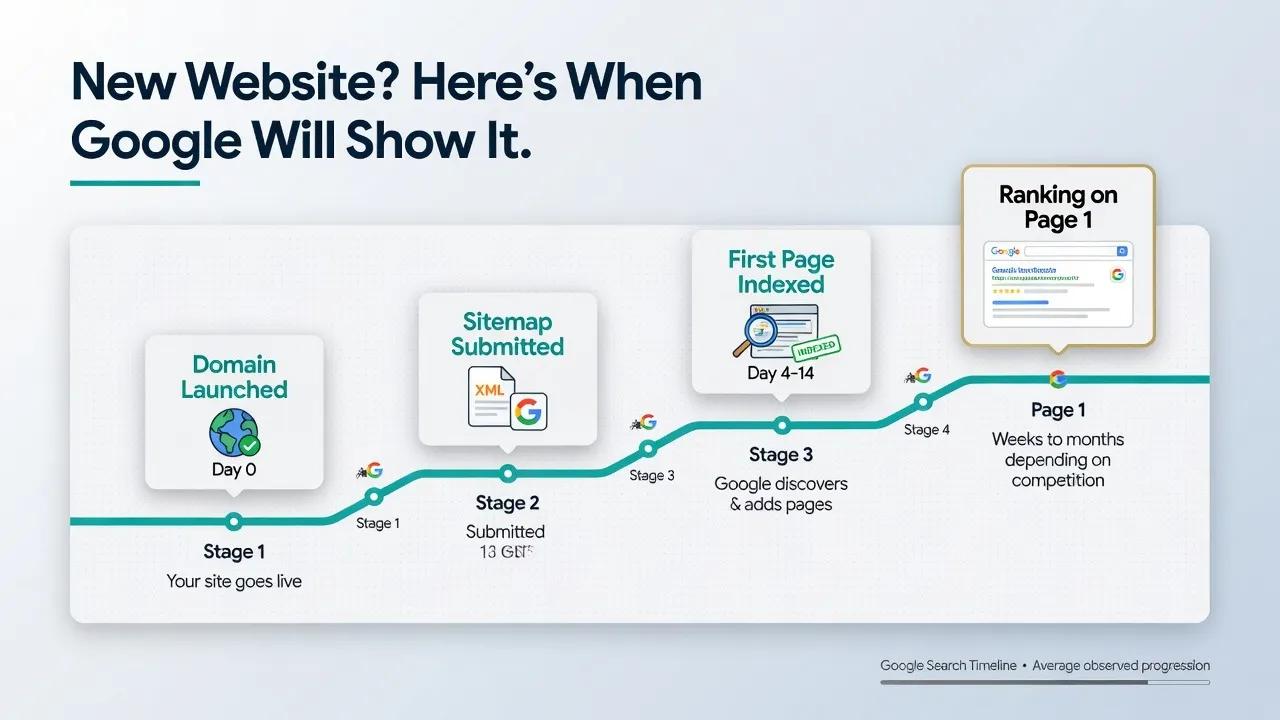
Search engines don't automatically rank new websites overnight. You must explicitly announce your site's existence to Google.
Setting up Google Search Console provides direct visibility into your technical search health:
- Create a Google Search Console account using your main business address.
- Verify domain ownership by adding the required DNS TXT record or HTML tag.
- Track your real-time website indexing status and address crawl errors immediately.
Connecting directly to Search Console establishes a communication line with Google, allowing you to monitor and improve your organic search performance.
Submit Your Sitemap and Check Your Important Pages
Once your Search Console property is active, you need to guide search crawlers through your site structure.
Accelerate indexing with an XML sitemap:
- Locate your auto-generated sitemap URL (typically yourdomain.com/sitemap.xml).
- Submit the sitemap link directly within the Google Search Console dashboard.
- Request manual URL inspection for high-priority landing pages to request immediate indexing.
Submitting a clean sitemap provides search engines with a roadmap to crawl and index your revenue-generating pages efficiently.

Set Up Analytics So You Can See What Visitors Do
You cannot scale what you do not measure. Setting up analytics tracking early gives you baseline data on visitor counts and behavior.
Deploy Google Analytics to gather actionable behavioral insights:
- Track total website traffic sources (organic search, direct, social, and referral).
- Set up explicit event goals for form submissions, phone call clicks, and product purchases.
- Identify high-bounce pages to pinpoint where prospective buyers lose interest.
Robust visitor tracking turns real-time data into clear design and marketing improvements. Learn how to analyze website data to optimize your funnel.

Set Up Your Business Profiles and Share Your New Website
Don't wait for organic search traffic to arrive on its own. Immediately promote your new site across all established brand channels.
Distribute your URL across your business ecosystem:
- Update your Google Business Profile with your new web address and accurate contact details.
- Add your website link to all official social media profiles, email signatures, and directory listings.
- Send a dedicated launch announcement to your existing email list introducing the new digital experience.
Cross-promoting your new site builds immediate referral traffic and reinforces brand credibility. Use this momentum to drive more qualified visitors to your pages.
Start Creating Content Around What Your Customers Search For
"How will people discover me on Google?"
Ranking for high-intent keywords requires publishing helpful, targeted content that addresses what your prospective clients are actively searching for.
Execute a simple SEO content strategy:
- Identify core industry search terms, client pain points, and commercial queries.
- Write detailed service overviews, direct comparison guides, and practical answer guides.
- Organize your published topics into clear categories using explicit headline hierarchies.
Consistent, high-quality content marketing builds search authority and brings in a steady stream of organic leads. Read our guide on writing SEO-friendly website content to get started.

Watch Your First Visitors and Fix What Isn't Working
Your initial assumptions about user behavior might not match how visitors actually navigate your new site. Real user data shows you exactly where to make adjustments.
Focus on practical website optimization:
- Review analytics data after your first 100 to 500 visitors.
- Reorganize call-to-action buttons if visitors are scrolling past your lead forms.
- Refine headlines and body copy if specific pages show unusually high bounce rates.
Making small, data-backed adjustments turns early traffic into predictable customer conversions. Implement these conversion rate optimization tactics to maximize results.
Keep Your Website Updated After Launch
A static website quickly becomes obsolete. Regular website maintenance protects your brand reputation and maintains long-term search performance.
Establish a recurring update routine:
- Review team bios, business hours, and pricing lists quarterly to ensure 100% accuracy.
- Add new client testimonials, project case studies, and visual proofs regularly.
- Keep underlying platform features and security certificates active.
Keeping your business details current proves to both search engines and visitors that your company is active, reliable, and growing. Ensure your website trust signals remain fresh.
Keep Growing Your Website After Launch
A successful website is an evolving growth engine, not a static digital brochure. To stay ahead of competitors, you need to continuously acquire high-quality backlinks using tools like Ahrefs, pitch industry publications, and publish fresh, rank-ready content that keeps search engines coming back.
However, managing manual updates, wrestling with complex code, or spending hours writing blogs can quickly stall your momentum.
Scale Confidently After Launch with BoltWeb
BoltWeb is a modern AI website builder and small business website builder designed to eliminate technical hurdles, so you can build, launch, and scale your digital presence effortlessly.
Why Growing Businesses Rely on BoltWeb:
Confident AI Generation & Quick Launch
BoltWeb handles underlying page architecture, mobile performance, and technical SEO structure automatically—ensuring you launch a fast, search-ready site right out of the gate.
Instant Dashboard Editing & Rapid Publishing
Made a mistake or need to update your offerings after launch? Simply log into your BoltWeb dashboard, adjust your site details, and publish updates instantly with a single click.
AI-Assisted Blog & Content Engine
Scale your organic traffic faster with integrated AI writing tools. BoltWeb helps you research, draft, and publish SEO-optimized blog posts in minutes, making it simple to target high-intent search terms and build authority.
Commercial Integrations & Lead Generation
Connect custom domains, collect client leads, and process payments directly through native Stripe, PayPal, and Paddle integrations.

Essential FAQs: What to Do After Launching a Website
Navigating the post-launch phase of a new site requires a clear technical and marketing strategy. Optimizing your content for artificial intelligence engine optimization (AIEO) and generative engine optimization (GEO) means providing direct, authoritative answers that answer engines (like ChatGPT, Perplexity, and Google AI Overviews) can easily parse, extract, and cite.
Here are the 12 most critical post-launch questions answered directly to maximize your search visibility and user conversion.
What is the very first thing to do after launching a new website?
The immediate priority after going live is performing thorough website testing across multiple browsers and mobile devices. Verify that all primary lead capture forms, navigation menus, checkout links, and social buttons function without errors. Confirming that your site renders properly across every viewport prevents early bounce rates and protects your initial brand impression. Follow a comprehensive website launch checklist to ensure nothing is missed.
How do I get Google to index my newly launched website quickly?
To speed up website indexing, set up Google Search Console, verify your domain ownership, and submit your auto-generated XML sitemap URL directly. Explicitly requesting indexing for your core pages prompts search engine crawlers to discover, scan, and list your content in organic search results faster than waiting for automatic discovery. Read our guide on how to get a new website indexed by Google to accelerate this process.
How do I track visitor behavior on my new website?
Install Google Analytics or a privacy-focused analytics script immediately after launch to monitor active website traffic sources, visitor demographics, and user interaction paths. Setting up conversion goals for form submissions, link clicks, and product purchases establishes your baseline performance metrics and reveals which pages drive the highest engagement.
How can I ensure my newly launched site works on mobile phones?
Achieving a truly mobile-friendly website requires testing tap targets, font sizes, image container scaling, and vertical layout shifts on physical mobile devices. Ensuring your content resizes dynamically without horizontal scrolling keeps your mobile bounce rates low and maintains strong rankings under Google's mobile-first indexing policy. Learn how to make a website easy to use to perfect the mobile experience.
Why are my website forms and buttons not sending email notifications?
Form delivery failures usually stem from incorrect SMTP server settings or missing domain authentication records like SPF, DKIM, and DMARC. Testing every contact form on your live site ensures lead submissions reach your inbox instead of being blocked or marked as spam by standard email providers. Review our tutorial on how to add a lead form to a website to ensure your setup is flawless.
How do I build immediate referral traffic to a new website?
Promote your official URL across all established channels by updating your Google Business Profile, updating social media profile bios, and adding the link to employee email signatures. Announcing your launch through a dedicated email broadcast to existing contacts drives instant, highly qualified referral visits to your new digital home.
How do I start creating content that ranks on Google after launch?
Focusing on targeted SEO content requires identifying high-intent commercial keywords and customer pain points within your niche. Publishing comprehensive service overviews, targeted comparison articles, and practical answer guides structured with clear headline hierarchies helps search engines establish your site's topical authority. Discover how to choose keywords for your website to target the right terms.
What should I check if my newly launched website is loading slowly?
Addressing slow website performance requires analyzing your site using tools like PageSpeed Insights to identify bloated uncompressed images, heavy scripts, or missing browser caching. Optimizing media files, enabling file compression, and serving assets through a content delivery network drastically reduces page load times and improves core web vitals scores. Read our guide on why your website is slow to diagnose and fix these issues.
How do I fix broken links or layout errors discovered after launch?
Regular website maintenance includes running automated crawling tools to identify broken internal links, missing image alt text, and misplaced page redirects. Resolving these minor technical issues quickly prevents user frustration, preserves search engine crawl efficiency, and maintains high user trust across your core landing pages.
When should I start optimizing my new website for higher conversions?
Begin reviewing your conversion funnel once your site collects data from its first 100 to 500 visitors. Analyzing user drop-off points, refining call-to-action button placements, and simplifying lead form fields allows you to execute data-driven website optimization adjustments that convert existing traffic into predictable business inquiries. Implement proven high-converting website strategies to maximize results.
How do I protect my newly launched website from technical security threats?
Protecting your web presence requires maintaining an active SSL certificate, configuring routine off-site database backups, and keeping underlying platform scripts up to date. Establishing strong administrator password policies and setting up basic firewall security rules safeguards user data and prevents malicious malware injections. Follow our tutorial on how to add SSL to a website to secure your data.
How do I scale my website content and search visibility effortlessly after launch?
Scaling organic traffic after going live requires consistently publishing fresh, rank-ready content using a modern business website builder or small business website builder like BoltWeb. Leveraging integrated AI editing tools, structured landing page templates, and seamless blog publishing features allows you to expand your search footprint and capture qualified leads without handling complex manual code updates. Explore the best website builder for small business needs to scale effortlessly.