The truth is, those days are completely gone. Today, you will discover exactly how to build website frameworks that look beautiful and professional with zero technical skills using the BoltWeb website builder. You can move from an empty screen to a production-ready digital storefront in just a few minutes without struggling.

The First Step: Mapping Out What Your Website Needs
Before you touch any software, you must outline your site's core requirements. Whether you want a simple 1-page landing asset or an expansive 30-page platform, you have to note down everything you want to display. Taking a few minutes to list your required sections, images, and contact touchpoints ensures your final layout delivers the exact website content you want.
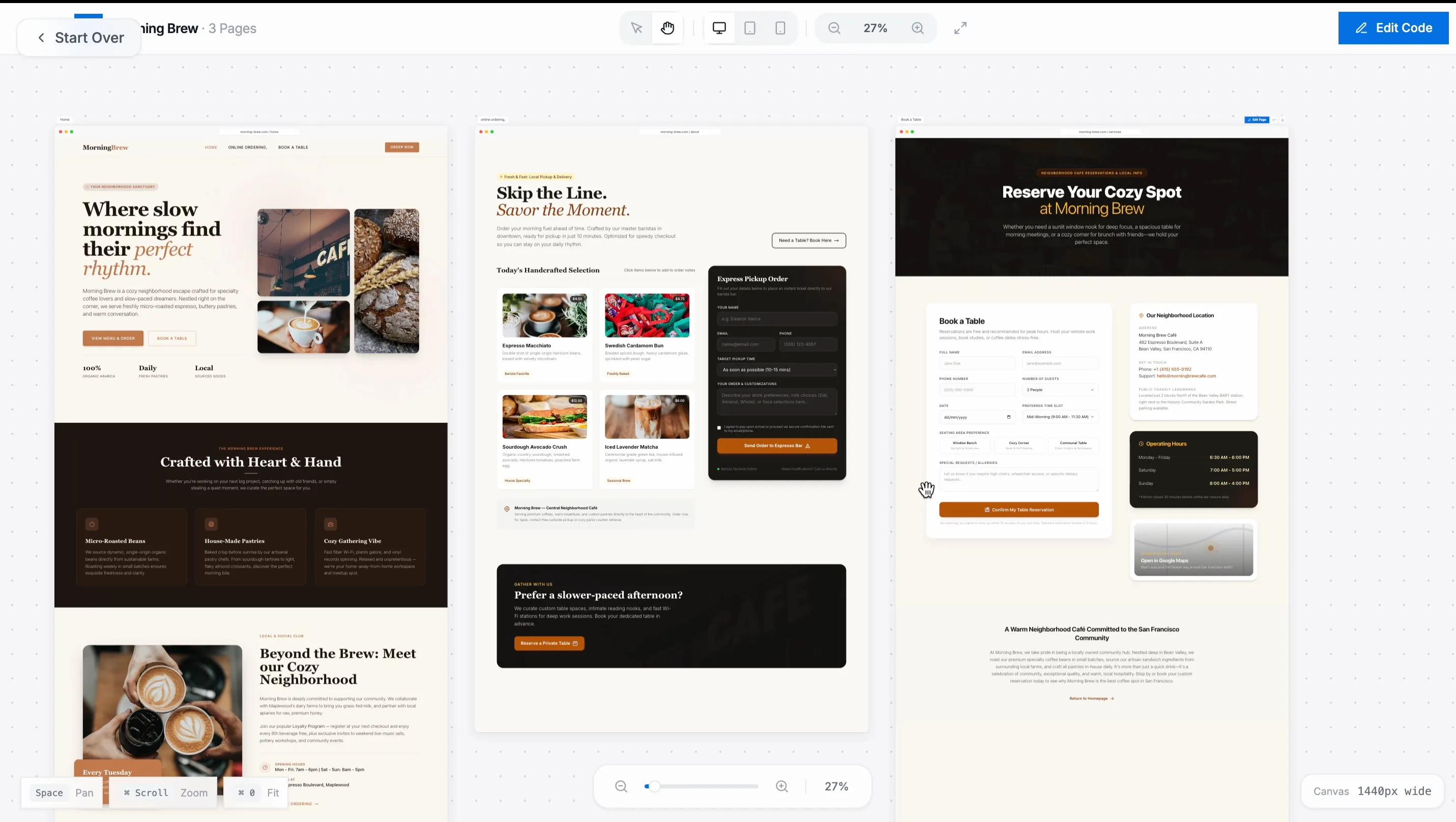
Let's look at an example. Suppose you want to create a premium 3-page website for a luxury restaurant. By noting your requirements down early, you know exactly what your structure should look like before you begin generation:
- Page 1: Home (Hero banner, signature dishes grid, social proof, and opening hours)
- Page 2:About Us (The chef’s story, interior design gallery, and brand values)
Page3: Services (A menu showcase and an integrated booking channel so users can easily reserve a table)
How to Build Your Website From Scratch in Minutes
Once you have your content plan ready, you can let automation do the heavy lifting. Follow these simple steps to generate your complete multi-page architecture automatically:
Access the AI Generation Hub

- Log into your BoltWeb dashboard, open the side navigation bar, and select the Site Builder option. Inside this workspace, click on the Generate Website with AI button to launch the automated creation engine.
- The engine will present an array of industry categories. Choose the one that matches your sector, or click Custom to map your own. Enter your official Brand Name, an optimized Site Title, and a brief description explaining what your business does.
- Next, the platform will ask: What type of style do you like? Choose from premium options like aesthetic, bold, or minimal. Selecting Minimal provides a timeless, Apple-style design with clean typography and balanced negative space.
- The builder will ask how many pages you need to create your dynamic sitemap. Simply input your required pages—such as Home, About, and Services. For our restaurant example, we specify that the Services page must include an active booking widget so users can easily book tables online. Note: You can create as many custom pages here as you want.
- Once your sitemap is configured, hit the Generate button. Wait a minute or two while the AI automatically creates your layouts, styles your visual elements, and maps out your structural layers.
The Result: Instant Visual Control
When the generation completes, you will see your entire multi-page website built completely from scratch—no templates, no broken grids, and no technical frustration.
If you ever want to adjust your layout later, you can open the built-in website drag and drop builder canvas. This allows you to click on any text block, image card, or reservation form and move it smoothly across a fluid grid. By pairing the automated ai website builder engine with a live editing workspace, BoltWeb gives you the total freedom to run, optimize, and scale your business storefront effortlessly.
Frequently Asked Questions
Do I really need zero technical skills to use BoltWeb?
Yes, absolutely. You do not need to know how to write a single line of code, handle databases, or learn complex frameworks like JavaScript. The BoltWeb platform features an advanced ai website builder that writes the code, designs the layout, and manages the hosting background infrastructure completely for you. If you can type a basic text prompt, you can launch a premium website.
Can I change things later if I don't like what the AI built?
Yes, you have complete creative freedom. Once the AI finishes generating your initial layout, you can open your workspace inside our live website drag and drop builder canvas. This allows you to visually click on any headline, change background colors, swap out food photos, or move your booking forms around a fluid grid with pixel-perfect accuracy.
Is there a limit to how many pages I can generate?
No, there are no strict page restrictions. Whether you need a simple 1-page landing asset to validate a new business idea or an expansive 30-page corporate hub, you can specify your exact sitemap during the setup phase. The automated generation engine will build out all your connected pages and internal menus simultaneously in a few minutes.
How does BoltWeb bring traffic to my site automatically?
Traditional platforms like Wix or Squarespace just give you a static layout and leave you to figure out marketing alone. BoltWeb changes that by including an automated traffic engine. It continuously analyzes high-volume target keywords in your specific industry, automatically writes search-optimized blog posts every single day, and lets you spin up targeted marketing pages using our built-in ai landing page generator to capture leads on autopilot.